[](https://travis-ci.org/fabiocaccamo/django-admin-interface)
[](https://opencollective.com/django-admin-interface) [](https://codecov.io/gh/fabiocaccamo/django-admin-interface)
[](https://www.codacy.com/app/fabiocaccamo/django-admin-interface)
[](https://badge.fury.io/py/django-admin-interface)
[](https://img.shields.io/pypi/dm/django-admin-interface.svg)
[](https://img.shields.io/pypi/pyversions/django-admin-interface.svg)
[](https://img.shields.io/pypi/l/django-admin-interface.svg)
# django-admin-interface
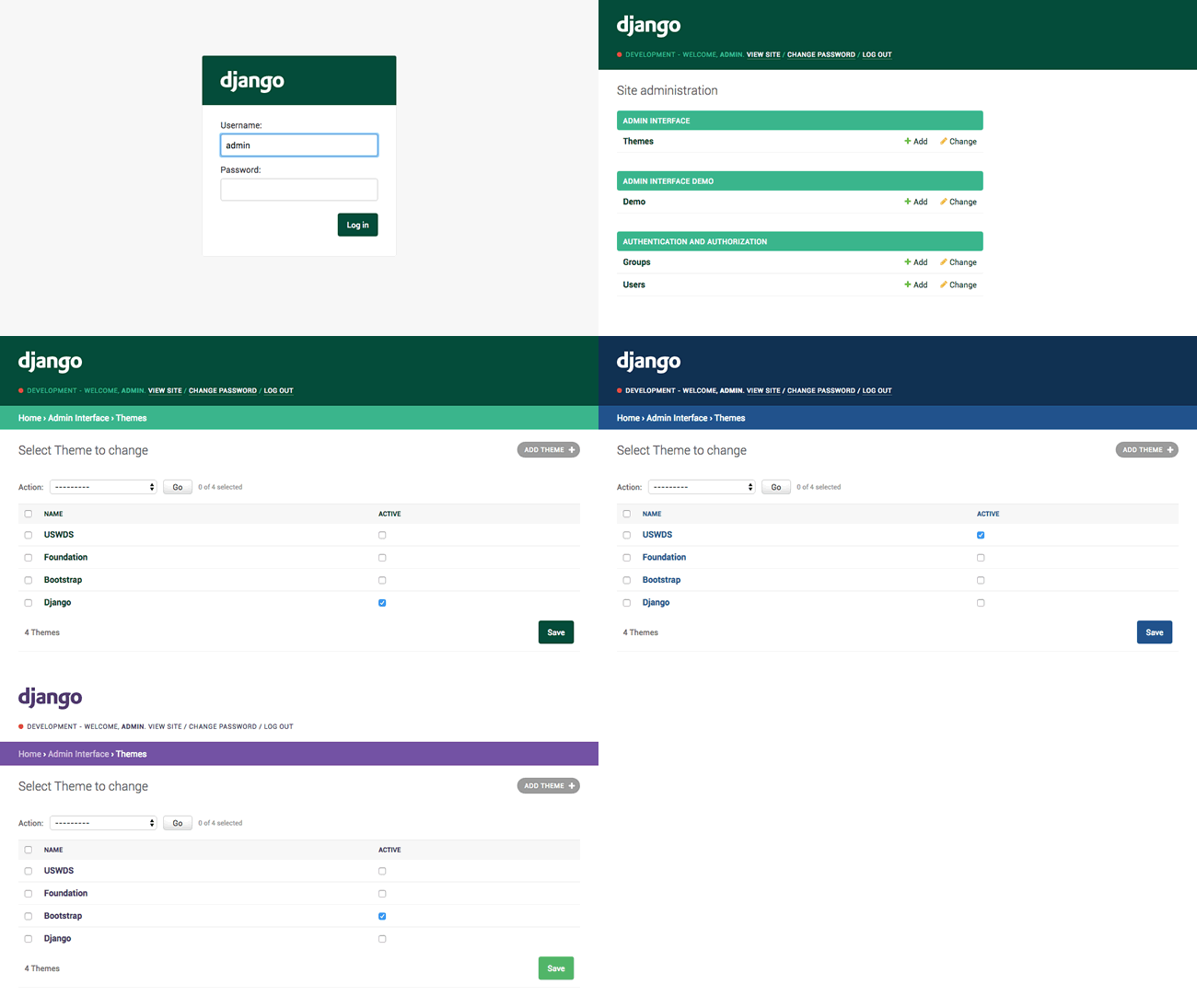
django-admin-interface is a modern **responsive flat admin interface customizable by the admin itself**.
## Features
- Beautiful default **django-theme**
- Themes management and customization *(you can **customize admin title, logo and colors**)*
- Responsive
- List filter dropdown *(optional)*
- `NEW` **Related modal** *(instead of the old popup window, optional)*
- `NEW` **Environment name/marker**
- `NEW` **Language chooser**
- Compatibility / Style optimizations for:
- `django-ckeditor`
- `django-dynamic-raw-id`
- `django-modeltranslation`
- `django-tabbed-admin`
- `sorl-thumbnail`
## Requirements
- Python 2.7, 3.4, 3.5, 3.6, 3.7
- Django 1.7, 1.8, 1.9, 1.10, 1.11, 2.0, 2.1, 2.2
## Installation
- Run `pip install django-admin-interface`
- Add `admin_interface`, `flat_responsive`, `flat` and `colorfield` to `settings.INSTALLED_APPS` **before** `django.contrib.admin`
```python
INSTALLED_APPS = (
#...
'admin_interface',
'flat_responsive', # only if django version < 2.0
'flat', # only if django version < 1.9
'colorfield',
#...
'django.contrib.admin',
#...
)
```
- Run ``python manage.py migrate``
- Run ``python manage.py collectstatic``
- Restart your application server
#### Upgrade
- Run `pip install django-admin-interface --upgrade`
- Run ``python manage.py migrate`` *(add* ``--fake-initial`` *if you are upgrading from 0.1.0 version)*
- Run ``python manage.py collectstatic --clear``
- Restart your application server
## Optional themes
This package ships with optional themes as fixtures, they can be installed using the [loaddata admin command](https://docs.djangoproject.com/en/1.11/ref/django-admin/#django-admin-loaddata). Optional themes are activated on installation.
##### [Django](https://www.djangoproject.com/) theme (default):
Run ``python manage.py loaddata admin_interface_theme_django.json``
##### [Bootstrap](http://getbootstrap.com/) theme:
Run ``python manage.py loaddata admin_interface_theme_bootstrap.json``
##### [Foundation](http://foundation.zurb.com/) theme:
Run ``python manage.py loaddata admin_interface_theme_foundation.json``
##### [U.S. Web Design Standards](https://standards.usa.gov/) theme:
Run ``python manage.py loaddata admin_interface_theme_uswds.json``
### Add more themes
You can add a theme you've created through the admin to this repository by [sending us a PR](http://makeapullrequest.com/). Here are the steps to follow to add :
1. Export your exact theme as fixture using the `dumpdata` admin command:
``python manage.py dumpdata admin_interface.Theme --indent 4 -o admin_interface_theme_{{name}}.json --pks=N``
2. Copy the generated json file into the fixtures folder *(making sure its name starts with* `admin_interface_theme_` *to avoid clashes with fixtures that might be provided by other third party apps)*.
3. Remove the `"pk"` from the fixture and make sure the `active` field is set to `true` *(in this way a theme is automatically activated when installed)*.
4. Edit the section above to document your theme.
## Screenshots
###### Admin login

---
###### Admin dashboard

---
###### Admin themes management

---
###### Admin theme customization

## FAQ
- #### I already have a custom `base_site.html`, how can I make it work?
You can use [django-apptemplates](https://github.com/bittner/django-apptemplates), then add `{% extends "admin_interface:admin/base_site.html" %}` to your `base_site.html`
---
## Contributors
### Code Contributors
This project exists thanks to all the people who contribute. [[Contribute](CONTRIBUTING.md)].
 ### Financial Contributors
Become a financial contributor and help us sustain our community. [[Contribute](https://opencollective.com/django-admin-interface/contribute)]
#### Individuals
### Financial Contributors
Become a financial contributor and help us sustain our community. [[Contribute](https://opencollective.com/django-admin-interface/contribute)]
#### Individuals
 #### Organizations
Support this project with your organization. Your logo will show up here with a link to your website. [[Contribute](https://opencollective.com/django-admin-interface/contribute)]
#### Organizations
Support this project with your organization. Your logo will show up here with a link to your website. [[Contribute](https://opencollective.com/django-admin-interface/contribute)]


 ## License
Released under [MIT License](LICENSE.txt).
## License
Released under [MIT License](LICENSE.txt).